


Published: May 4, 2020
In Making your website "cross-origin isolated" using COOP and COEP we explained how to adopt to "cross-origin isolated" state using COOP and COEP. This is a companion article that explains why cross-origin isolation is required to enable powerful features on the browser.
Glossary
This document uses many similarly named and abbreviated terminology. To clarify, we've curated a mini glossary:
- COEP: Cross Origin Embedder Policy
- COOP: Cross Origin Opener Policy
- CORP: Cross Origin Resource Policy
- CORS: Cross Origin Resource Sharing
- CORB: Cross Origin Read Blocking
Background
The web is built on the same-origin policy, a
security feature that restricts how documents and scripts can interact with
resources from another origin. This principle restricts the ways websites can
access cross-origin resources. For example, a document from https://a.example
is prevented from accessing data hosted at https://b.example.
However, the same-origin policy has had some historical exceptions. Any website can:
- Embed cross-origin iframes
- Include cross-origin resources such as images or scripts
- Open cross-origin dialog windows with a DOM reference
By the time the web community realized the benefits of a strict same-origin policy, the web already relyied on these exceptions.
The security side-effects of such a lax same-origin policy were patched in two ways:
- The Cross Origin Resource Sharing (CORS) protocol makes sure that the server allows sharing a resource with a given origin.
- Developers implicitly remove direct script access to cross-origin resources,
while preserving backward compatibility. Such cross-origin resources are
called "opaque" resources. This is why cross-origin pixel manipulation with
CanvasRenderingContext2Dfails unless CORS is applied to the image.
All of these policy decisions are happening within a browsing context group.
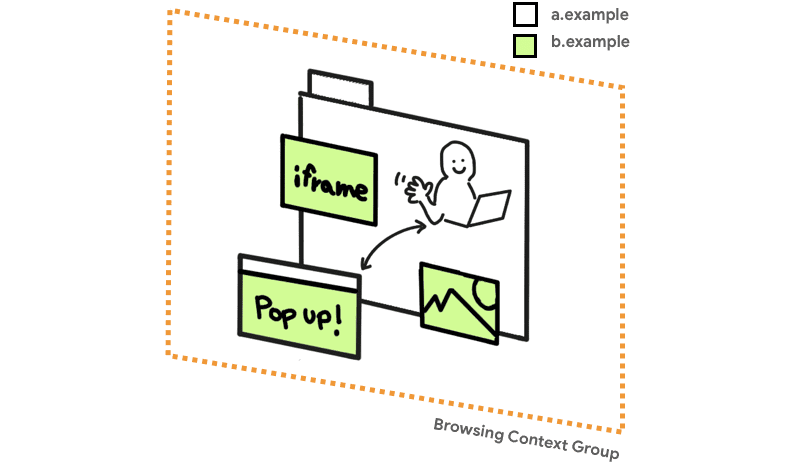
For a long time, this combination was enough to keep browsers safe, with limited edge cases that needed direct patching (such as JSON vulnerabilities).
This changed with
Spectre, which
makes any data that is loaded to the same browsing context group as your code
potentially readable. By measuring the time certain operations take, attackers
can guess the contents of the CPU caches, and therefore the contents of the
process' memory. Such attacks are possible with low-granularity timers
that exist in the platform, and can be sped up with high-granularity timers,
both explicit (such as performance.now()) and implicit (such as
SharedArrayBuffers).
If evil.com embeds a cross-origin image, they can use a
Spectre attack to read the embbed image's pixel data. This renders protections that
rely on "opaqueness" ineffective.
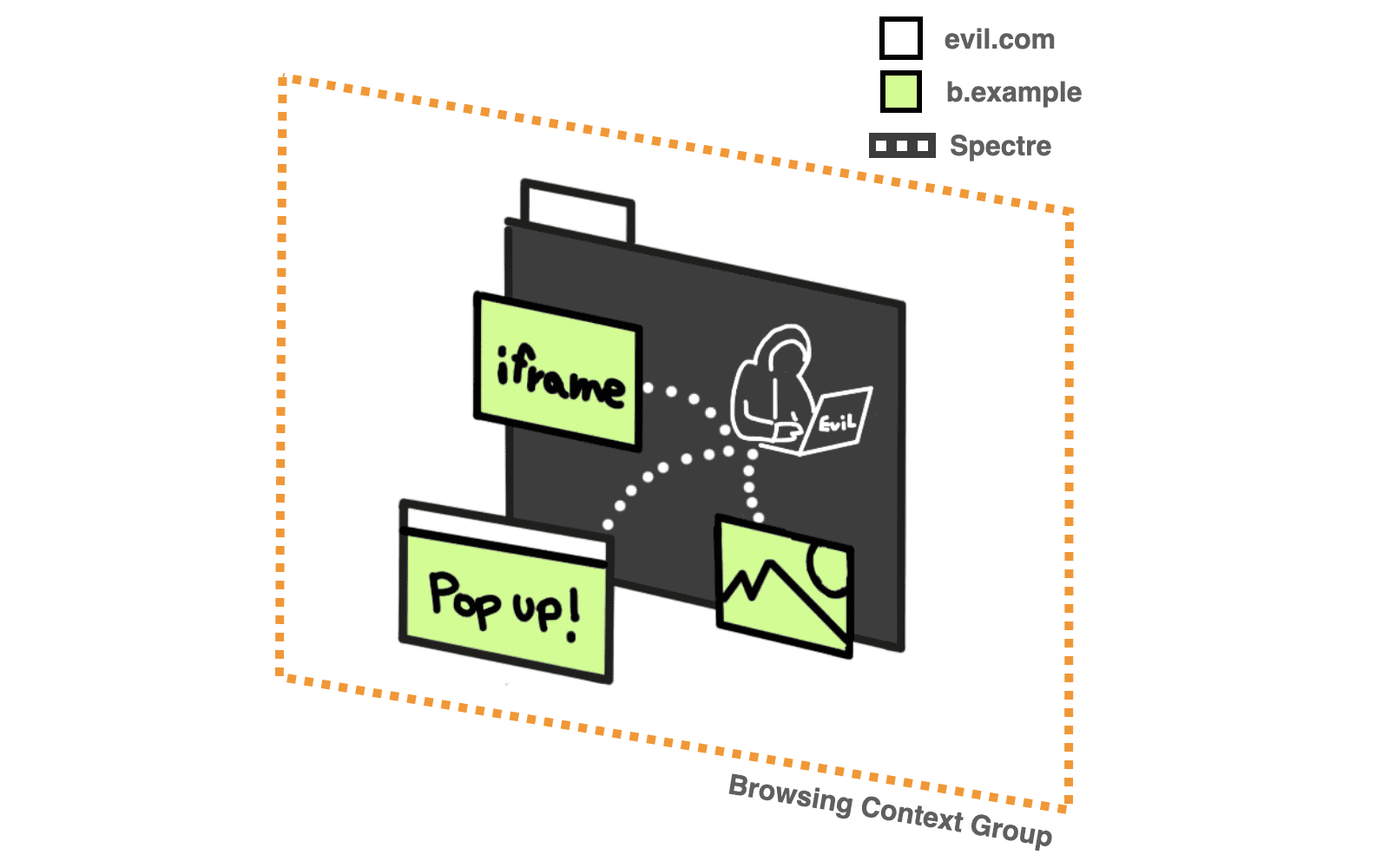
Ideally, all cross-origin requests are vetted by the server that owns the resource. If vetting wasn't performed, then the data should never makes it to the browsing context group of an evil actor. Thus, the data stays out of reach of possible Spectre attacks. We call this a cross-origin isolated state.
When the embedded code is in a cross-origin isolated state, the requesting site
is considered less dangerous. This allows for the requesting site to use
SharedArrayBuffer, performance.measureUserAgentSpecificMemory() and
high resolution timers with better precision,
while preventing possible Spectre attacks. This state also prevents modifying
document.domain.
Cross Origin Embedder Policy
Cross Origin Embedder Policy (COEP) prevents a document from loading any cross-origin resources that don't explicitly grant the document permission with CORP or CORS. With this feature, you can declare that a document cannot load such resources.
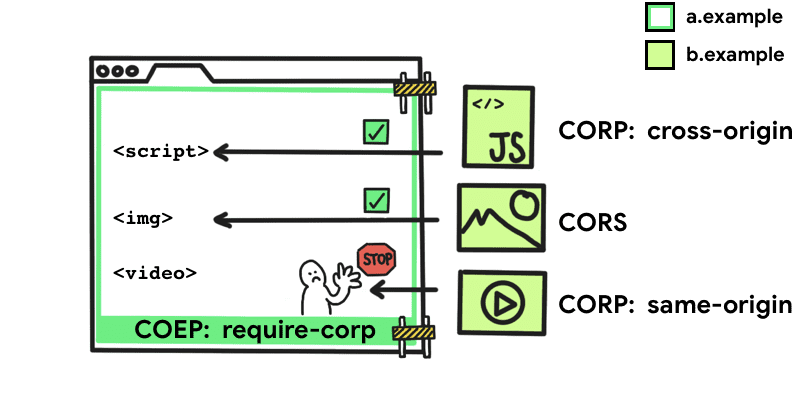
a.example,
set the COEP policy to require-corp. a.example wants
to embed 3 assets from b.example, but only two are successful.
The two successful embeds include a JavaScript file with a cross-origin CORP
policy and an image with CORS allowed. The third asset is a video that has a
CORP policy that requires the asset be embedded on the same-origin only,
therefore the video won't be loaded on a.example.
To activate this policy, append the following HTTP header to the document:
Cross-Origin-Embedder-Policy: require-corp
COEP takes a single value of require-corp. This enforces the policy that the
document can only load resources from the same origin, or resources explicitly
marked as loadable from another origin.
For resources to be loadable from another origin, they need to support either Cross Origin Resource Sharing (CORS) or Cross Origin Resource Policy (CORP).
Cross Origin Resource Sharing
If a cross origin resource supports Cross Origin Resource Sharing
(CORS), you may use the
crossorigin
attribute
to load it to your web page without being blocked by COEP.
<img src="https://third-party.example.com/image.jpg" crossorigin>
For example, if this image resource is served with CORS headers, use the
crossorigin attribute so that the request to fetch the resource will use CORS
mode. This also
prevents the image from being loaded unless it sets CORS headers.
Similarly, you may fetch cross origin data through the fetch() method, which
doesn't require special handling as long as the server responds with the right
HTTP
headers.
Cross Origin Resource Policy
Cross Origin Resource Policy (CORP) was originally introduced as an opt-in to protect your resources from being loaded by another origin. In the context of COEP, CORP can specify the resource owner's policy for who can load a resource.
The Cross-Origin-Resource-Policy header takes three possible values:
Cross-Origin-Resource-Policy: same-site
Resources that are marked same-site can only be loaded from the same site.
Cross-Origin-Resource-Policy: same-origin
Resources that are marked same-origin can only be loaded from the same origin.
Cross-Origin-Resource-Policy: cross-origin
Resources that are marked cross-origin can be loaded by any website. (This
value was added to the
CORP spec along with COEP.)
Cross Origin Opener Policy
Cross Origin Opener Policy
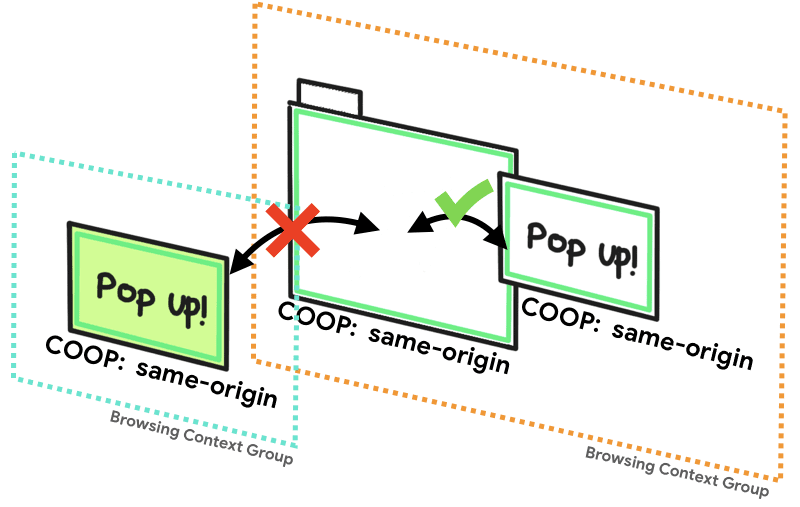
(COOP) lets you isolate a
top-level window from other documents, by putting the documents in a separate
browsing context group. This way, the documents cannot directly interact with
the top-level window. For example, if a document with COOP opens a dialog, its
window.opener property is null. The .closed property of the
opener's reference is true.
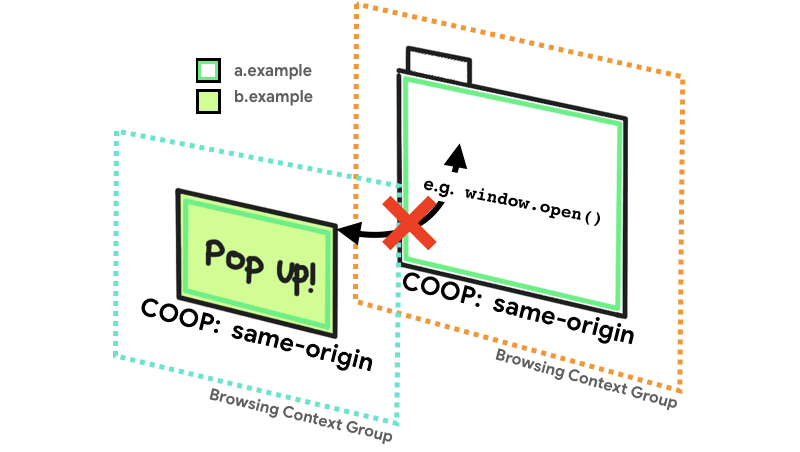
The Cross-Origin-Opener-Policy header takes three possible values:
Cross-Origin-Opener-Policy: same-origin
Documents that are marked same-origin can share the same browsing context
group with same-origin documents that are also explicitly marked same-origin.
Cross-Origin-Opener-Policy: same-origin-allow-popups
A top-level document with same-origin-allow-popups retains references to any
of its popups which either don't set COOP or which opt out of isolation by
setting a COOP of unsafe-none.
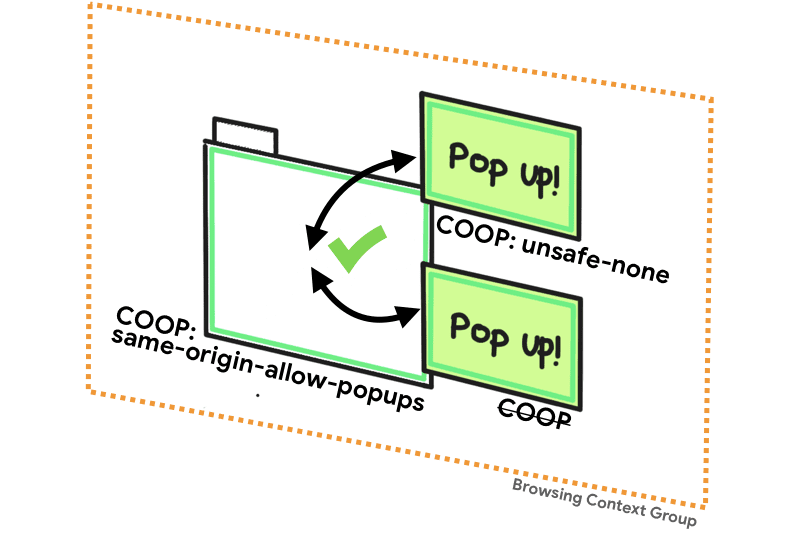
Cross-Origin-Opener-Policy: unsafe-none
unsafe-none is the default and allows the document to be added to its opener's
browsing context group unless the opener itself has a COOP of same-origin.
Summary
If you want access to features like SharedArrayBuffer,
performance.measureUserAgentSpecificMemory(), or high resolution
timers with better precision,
your document needs to use both COEP with the value of require-corp and
COOP with the value of same-origin. In the absence of either, the browser
won't guarantee sufficient isolation to safely enable those powerful features.
You can determine your page's situation by checking if
self.crossOriginIsolated
returns true.
Learn how to implement this in Making your website "cross-origin isolated" using COOP and COEP.